QR Nameplate Generator
Model serialized QR-enabled equipment tags with adjustable materials, engraving depths, and exportable artwork.
Open utility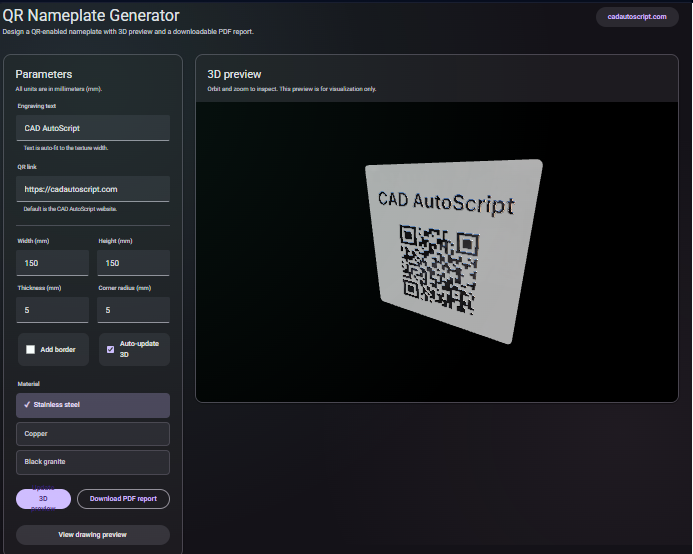
What it does
Create QR-enabled equipment tags with adjustable materials, engraving depths, and metadata lines. Preview the plate in 3D, tweak dimensions and branding layers, and export high-resolution PNG or SVG artwork for laser marking or UV printing.
When to use it (and when not to)
Use it when:
- You need a fast way to generate serialized tags for equipment or tooling.
- You want to hand vector-ready artwork to a printer or engraving shop.
- You are validating QR readability at different sizes before committing to a production run.
Avoid it when:
- You require database-backed serialization or production tracking.
- You need direct-to-printer drivers or layout imposition for mass printing.
Inputs and outputs
Inputs
| Input | Description |
|---|---|
| QR payload | URL, asset ID, or text encoded in the QR. |
| Tag metadata | Asset name, serial, warnings, or other overlay text. |
| Plate size and thickness | Overall dimensions plus engraving depth presets. |
| Material or finish preset | Visual style for stainless, aluminum, plastic, or painted plates. |
| Layout settings | QR size, margins, and typography for the printed plate. |
Outputs
| Output | Format | Notes |
|---|---|---|
| Nameplate artwork | PNG/SVG | High-resolution export for engraving or printing. |
| 3D preview | Viewport | Visual check of plate proportions and engraving depth. |
How to use
- Enter the QR payload and metadata you want on the tag.
- Set plate dimensions, margins, and engraving depth.
- Choose a material or finish preset.
- Review the 3D preview and adjust sizing if needed.
- Export PNG or SVG artwork for production.
Example dataset: Asset tag P-101 with QR pointing to https://cadautoscript.com/utilities/qr-nameplate/, 100 x 40 mm stainless look, engraving depth 0.3 mm.
- Expected output: Exports a PNG and SVG of the tag plus a preview that shows proportions and readable QR margins.
Accuracy and verification
- Ensure exported PNG/SVG resolution fits your printer or engraver requirements.
- Leave a quiet zone around the QR for reliable scanning.
- Test one printed sample before running a full batch to confirm readability.
- All rendering runs locally; keep a copy of exports for traceability.
FAQ
- Can I change materials? Yes. Pick a preset to visualize stainless, painted, or plastic plates.
- Is the QR vector or raster? SVG exports are vector; PNG is high-resolution raster.
- Does it work offline? Yes. Artwork generation happens in the browser.
- How do I keep the QR scannable? Maintain a quiet zone and avoid shrinking the code below your scanner's limits.
- Can I serialize many tags at once? Use the generator per tag and reuse your payload template.
Related tools
Changelog
- Initial documentation.
Feedback / bug report
- Open a GitHub issue
- Email or DM with the slug
qr-nameplateso we can reproduce the issue