PDF Master
Organize drawing packs, reorder or rotate individual sheets, and export a clean merged PDF before shop release.
Open utility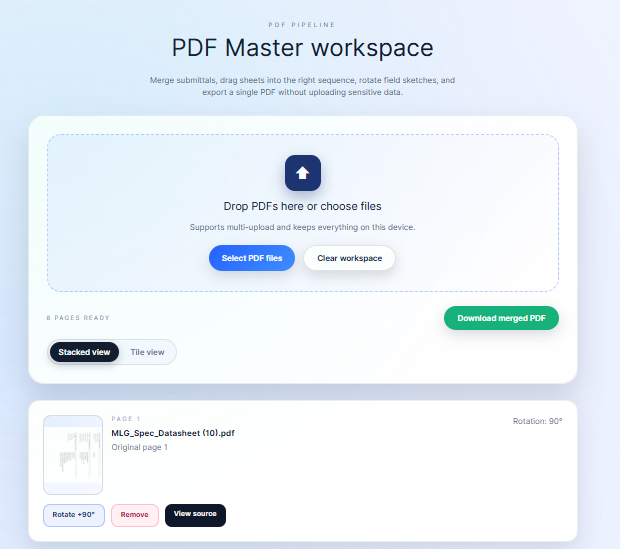
What it does
Drag and drop multiple PDFs, reorder or rotate pages, and export a clean merged package entirely in the browser. Use it to tidy drawing sets or review packs without sending files to a cloud service.
When to use it (and when not to)
Use it when:
- You need to reorder or rotate pages in a drawing package before release.
- You want to merge multiple PDFs into one without installing desktop tools.
- You prefer local processing for sensitive drawings.
Avoid it when:
- You need to edit text, redact content, or apply signatures (use PDF Batch Signer for stamps).
- Your files are extremely large and better handled by a dedicated desktop PDF editor.
Inputs and outputs
Inputs
| Input | Description |
|---|---|
| PDF files | Drop one or many PDFs to combine. |
| Page order | Drag to reorder pages or entire files. |
| Page rotation | Rotate misoriented sheets before export. |
Outputs
| Output | Format | Notes |
|---|---|---|
| Merged PDF | Combined and rotated pages in a single download. | |
| On-screen preview | Preview | Confirm order before exporting. |
How to use
- Drop the PDFs you want to combine.
- Reorder pages and rotate any misaligned sheets.
- Review the preview to ensure order is correct.
- Export the merged PDF.
- Share or archive the single, cleaned file.
Example dataset: Combine GA.pdf and details.pdf, rotate page 2 left, and export one merged drawing set.
- Expected output: Produces a single PDF with corrected orientation and page order ready for release.
Accuracy and verification
- Processing stays local; keep a backup of the originals in case you need to revert.
- Large files depend on browser memory; split batches if needed.
- Rotation and order changes do not alter content fidelity.
- Verify the merged file before distributing to the shop.
FAQ
- Does it compress or change quality? No intentional compression is applied; output mirrors the source pages.
- Can I delete pages? Reorder and rotate are primary actions; export only the pages you include.
- Is any data uploaded? No. Merging runs locally in your browser.
- What file size can it handle? Depends on your browser memory; split very large sets into smaller batches.
- Can I sign documents here? Use PDF Batch Signer for stamping; PDF Master focuses on ordering.
Related tools
Changelog
- Initial documentation.
Feedback / bug report
- Open a GitHub issue
- Email or DM with the slug
pdf-masterso we can reproduce the issue