Batch File Renamer
Rename files in bulk with find/replace, prefixes, casing, numbering, and instant ZIP download—all locally.
Open utility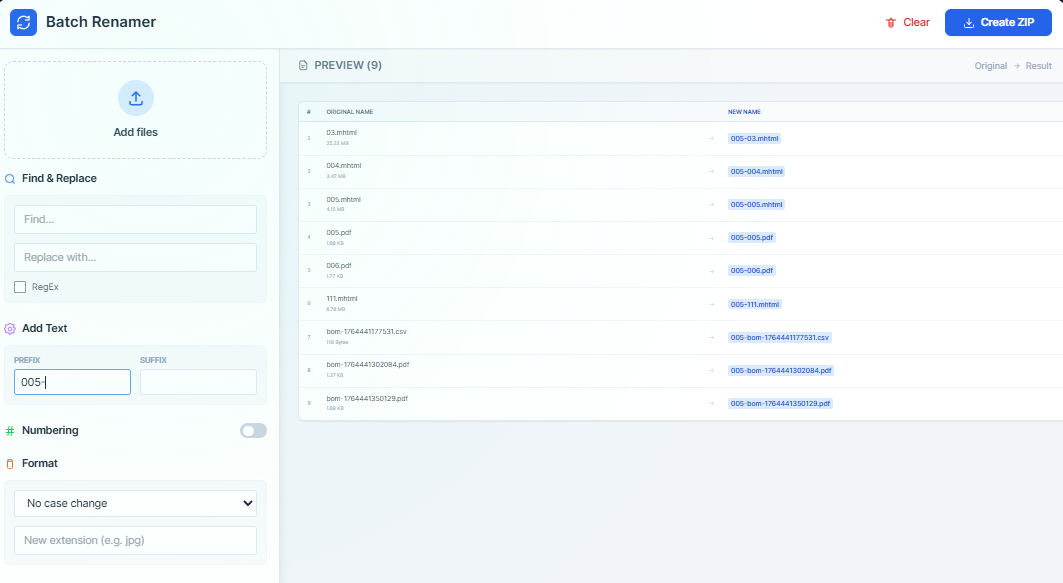
What it does
Upload a stack of files, preview new names with regex or literal find/replace, add prefixes, suffixes, or numbering, and download the renamed set as a ZIP. Everything runs in the browser so your files stay local.
When to use it (and when not to)
Use it when:
- You need to normalize drawing names or add job numbers before sending a package.
- You want to bulk apply numbering or prefixes without scripting.
- You prefer to keep renaming offline with a quick ZIP output.
Avoid it when:
- You need to rename thousands of files on disk; use a CLI script instead.
- You must retain folder hierarchy from nested directories; flattening may not be desired.
Inputs and outputs
Inputs
| Input | Description |
|---|---|
| Files to rename | Drop the files you want to process. |
| Find/replace rules | Use literal or regex patterns to transform names. |
| Prefix/suffix | Add job numbers, revs, or other tags. |
| Numbering | Set start, increment, and padding for sequence numbers. |
| Casing options | Optional upper/lower/kebab conversions. |
Outputs
| Output | Format | Notes |
|---|---|---|
| Preview table | On-screen | See old vs. new names before exporting. |
| Renamed files | ZIP | Downloadable archive with updated filenames. |
How to use
- Drop the files to rename.
- Apply find/replace, prefixes, suffixes, or numbering.
- Review the preview to confirm collisions are handled.
- Download the ZIP of renamed files.
- Share or archive the renamed package.
Example dataset: Upload P-001.pdf, P-002.pdf; find 'P-' and replace with 'FAB-', add prefix 2025_, start numbering at 10.
- Expected output: Downloads a ZIP with files named 2025_FAB-10.pdf and 2025_FAB-11.pdf.
Accuracy and verification
- Renaming happens in the browser; keep originals until you verify the ZIP.
- Regex patterns are powerful—test on a small set first.
- Name collisions are handled in the preview; resolve them before export.
- Large batches are limited by browser memory; split them if needed.
FAQ
- Do regex patterns work? Yes. Use standard JavaScript regex for advanced renames.
- Is folder structure preserved? Files are flattened into a ZIP with new names.
- Is data uploaded? No. Everything runs locally.
- How many files can I rename? Depends on browser memory; split very large sets.
- What about file contents? Contents stay unchanged; only names are updated.
Related tools
Changelog
- Initial documentation.
Feedback / bug report
- Open a GitHub issue
- Email or DM with the slug
file-renamerso we can reproduce the issue