Pipe Cutter Visualizer
Preview saddle intersections, adjust offsets, and export DXF wraps and hole templates for pipe fit-ups.
Open utility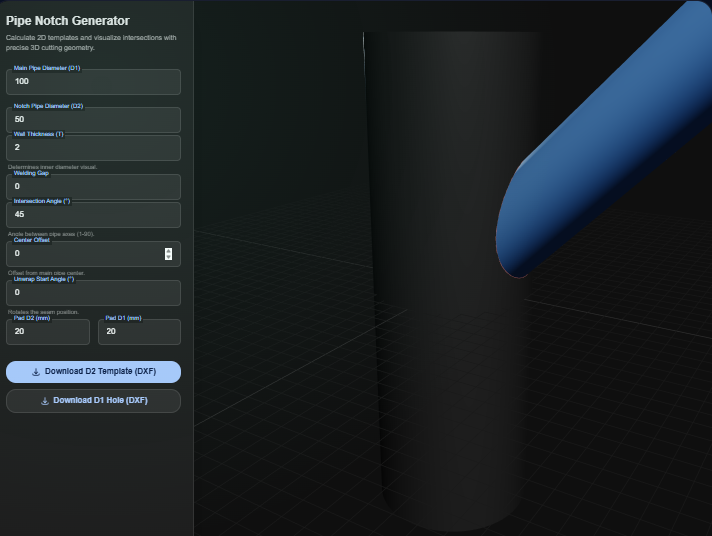
What it does
Pipe Cutter Visualizer renders pipe-to-pipe intersections in 3D so you can check the saddle fit before cutting. Enter run and branch diameters, tweak the intersection angle and offset, and download true-scale DXF wraps for the branch along with a matching cutout for the run pipe.
When to use it (and when not to)
Use it when:
- You know the run and branch diameters and need a wrap template for torch, plasma, or waterjet cutting.
- You want to preview clearance and offset before welding spool pieces.
- You need quick DXF geometry to drop into CAM or to print at 1:1 for the shop.
Avoid it when:
- You need reinforcement pad sizing or code calculations; this tool focuses on geometry only.
- The pipe is heavily ovalized or requires complex bevel allowances beyond simple offsets.
Inputs and outputs
Inputs
| Input | Description |
|---|---|
| Run pipe outside diameter (D1) | Base cylinder the saddle wraps around; note schedule or wall separately if needed. |
| Branch pipe outside diameter (D2) | Branch tube that will be notched and wrapped. |
| Intersection angle | Angle between run and branch centerlines; supports perpendicular or skewed joints. |
| Branch offset | Shift the saddle up or down to match real-world offsets before cutting. |
| Padding / trim allowance | Extra margin added to the DXF output so prints have bleed room for cutting. |
Outputs
| Output | Format | Notes |
|---|---|---|
| Branch wrap template | DXF | Unrolled saddle for wrapping the branch pipe at 1:1 scale. |
| Run-pipe cutout | DXF | Open polyline showing the hole to cut in the run pipe, with a reference box. |
| 3D preview | Viewport | Interactive view for checking alignment before exporting geometry. |
How to use
- Open the utility and enter diameters in the unit system you work with.
- Enter the run pipe OD, branch OD, and intersection angle.
- Add any offset or padding needed for your fit-up.
- Review the live 3D preview to confirm clearance and rotation.
- Export the DXF wrap and hole template, then print or send to CAM.
Example dataset: Run pipe OD: 114.3 mm, Branch OD: 60.3 mm, Angle: 45 deg, Offset: 10 mm, Padding: 5 mm.
- Expected output: Exports pipe_template.dxf and hole_template.dxf sized for a 1:1 print or CAM import.
Accuracy and verification
- Assumes round pipes with negligible ovality; check against actual stock.
- DXF export is geometric only; add bevel gaps or weld preps in the shop program if needed.
- Print at 100% scaling and verify a quick paper wrap before committing to steel.
- Pressure or reinforcement checks must be done separately.
FAQ
- Can I work in inch and metric? Yes. Enter values in the units you use as long as you keep inputs consistent; the DXF follows your numbers.
- Are the DXF templates true scale? Yes. The exports are generated at 1:1. Disable any print scaling when plotting.
- Can I tweak bevel allowance or root gap? Use the padding or offset controls to leave extra material, then finish the bevel in CAM or at the bench.
- Does it run offline? Yes. The calculation and DXF export run in the browser and stay on your device.
- Which CAD tools open the DXF? Any DXF-capable tool (AutoCAD, Fusion, SheetCAM, etc.) can import the polylines.
Related tools
Changelog
- Initial documentation.
Feedback / bug report
- Open a GitHub issue
- Email or DM with the slug
pipe-cutterso we can reproduce the issue