Folder Structure Builder
Design folder trees, import JSON or ZIP, and export bash/PowerShell scripts or a ZIP scaffold.
Open utility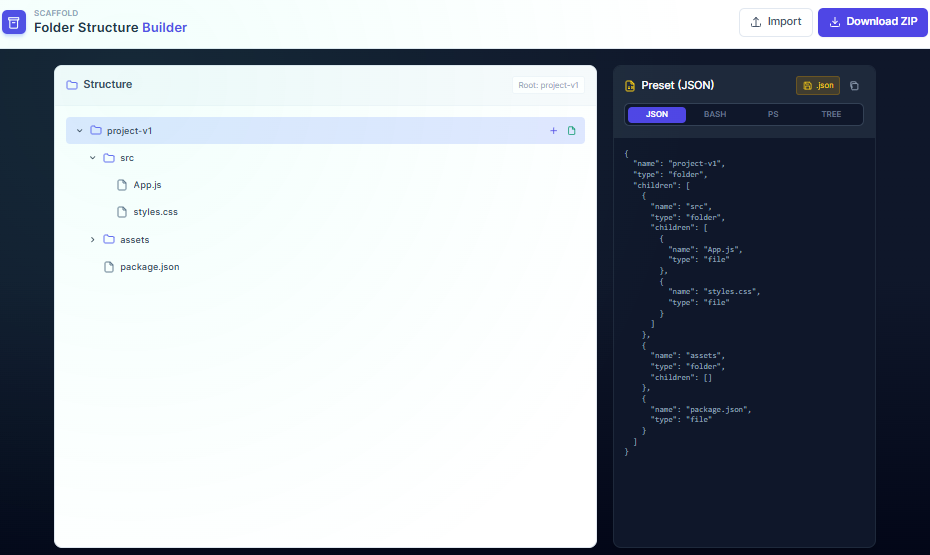
What it does
Lay out a project folder tree, import an existing JSON or ZIP, and export bash or PowerShell scripts that recreate the scaffold. Download a ZIP or JSON preset so teammates can build the same structure without manual clicking.
When to use it (and when not to)
Use it when:
- You are standardizing a project scaffold for your team.
- You need a quick ZIP scaffold for onboarding without running CLI tools.
- You want to share a folder preset across machines or teams.
Avoid it when:
- You need to provision servers or complex permissions; this focuses on folder trees.
- Your tree contains thousands of nodes; consider templating with code instead.
Inputs and outputs
Inputs
| Input | Description |
|---|---|
| Folder and file nodes | Add folders or files inline to design the tree. |
| JSON or ZIP import | Load an existing structure to modify or reuse. |
| Script options | Choose bash or PowerShell export depending on your environment. |
| Preset metadata | Optional labels or notes for the scaffold. |
Outputs
| Output | Format | Notes |
|---|---|---|
| Bash script | .sh | Script to recreate the tree on Unix-like systems. |
| PowerShell script | .ps1 | Script to recreate the tree on Windows. |
| ZIP scaffold | ZIP | Empty folders/files zipped for quick handoff. |
| JSON preset | JSON | Reusable preset to import later. |
How to use
- Start a new tree or import an existing JSON/ZIP.
- Add folders and files until the scaffold matches your project template.
- Pick bash or PowerShell export (or both).
- Download the script, ZIP, or JSON preset.
- Run the script in a safe directory to build the structure.
Example dataset: Create a scaffold with src/, docs/, tests/, and README.md placeholders; export a PowerShell script and ZIP for the team.
- Expected output: Provides a .ps1 script, a shell script, a ZIP scaffold, and a JSON preset representing the same tree.
Accuracy and verification
- Scripts create directories when you run them; review paths before executing.
- Special characters may need quoting on different shells; adjust if your environment is strict.
- Large trees are limited by browser memory when exporting a ZIP.
- All generation runs locally; keep presets under version control if needed.
FAQ
- Does it modify my drive automatically? No. It only creates scripts or ZIPs; you run them where you want the tree.
- Can I share presets? Yes. Export JSON and commit or email it to your team.
- Does it run offline? Yes. Everything happens in the browser.
- How are special characters handled? Scripts quote common characters, but review paths if you use unusual naming.
- Can I import an existing tree? Yes. Import from JSON or a ZIP scaffold to start from a prior template.
Related tools
Changelog
- Initial documentation.
Feedback / bug report
- Open a GitHub issue
- Email or DM with the slug
folder-structure-builderso we can reproduce the issue