PDF Number Extractor
Highlight QA serials, BOM IDs, and inspection numbers locally with WASM parsing and CSV export.
Open utility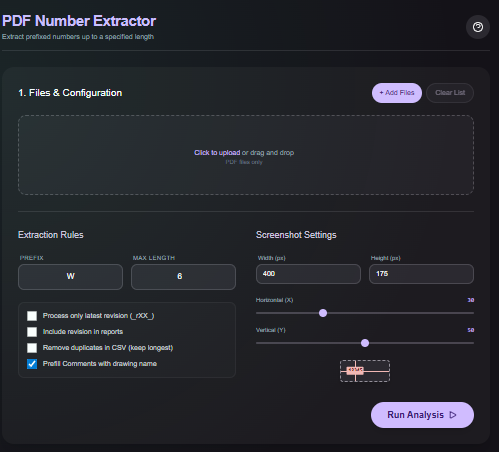
What it does
Drop PDF files, filter the detected numbers with regex or length rules, and export a clean list of matches. Parsing happens in-browser with WASM so QA serials, BOM IDs, and inspection numbers never leave your machine.
When to use it (and when not to)
Use it when:
- You need to pull serial numbers or IDs out of production PDFs for QA or traceability.
- You want to pre-fill spreadsheets with inspection IDs without retyping.
- You prefer an offline workflow with no uploads or queues.
Avoid it when:
- Your PDFs are scanned images that require OCR rather than text parsing.
- You need full-text search across thousands of pages at once.
Inputs and outputs
Inputs
| Input | Description |
|---|---|
| PDF files | Single or multiple PDFs dropped into the browser. |
| Regex or filter rules | Include or exclude patterns to isolate the numbers you need. |
| Minimum/maximum length | Optional constraints to avoid noise such as page numbers. |
| Export options | Choose CSV export or copy to clipboard. |
Outputs
| Output | Format | Notes |
|---|---|---|
| Highlighted matches | On-screen | Visual overlay of matched numbers for quick QA. |
| CSV export | CSV | List of extracted numbers per file ready for spreadsheets. |
| Clipboard copy | Text | Quick copy of matches without downloading a file. |
How to use
- Drag and drop the PDF files into the utility.
- Add regex or length filters to target the IDs you need.
- Review the highlighted matches on-screen.
- Export the results as CSV or copy them to your clipboard.
- Clear the session when finished; nothing is uploaded.
Example dataset: Upload an inspection report containing IDs like SN-2025-104; use a regex such as SN-\d4-\d3 and export the CSV.
- Expected output: Produces a CSV listing SN-2025-104 style matches plus an on-screen highlight for visual confirmation.
Accuracy and verification
- Works on text-based PDFs; scanned images need OCR elsewhere.
- Filters are case-sensitive only if you set them that way; double-check patterns before exporting.
- No network calls are made, so keep a local copy of your results if you need an audit trail.
- Spot-check a few lines against the PDF to ensure the regex did not over-filter.
FAQ
- Does it OCR scanned PDFs? No. It reads existing text; use OCR first if the PDF is an image.
- Can I process multiple files? Yes. Drop a stack of PDFs and export combined results.
- Is any data uploaded? No. Parsing happens locally in your browser.
- Can I tune the regex? Yes. Standard JavaScript regex syntax is supported.
- Can I save the highlights? Export the CSV and keep the PDF copy; highlights are for on-screen review only.
Related tools
Changelog
- Initial documentation.
Feedback / bug report
- Open a GitHub issue
- Email or DM with the slug
pdf-number-extractorso we can reproduce the issue