PDF BOM Extractor
Extract BOM and specification tables from vector PDFs into clean CSVs you can download locally.
Open utility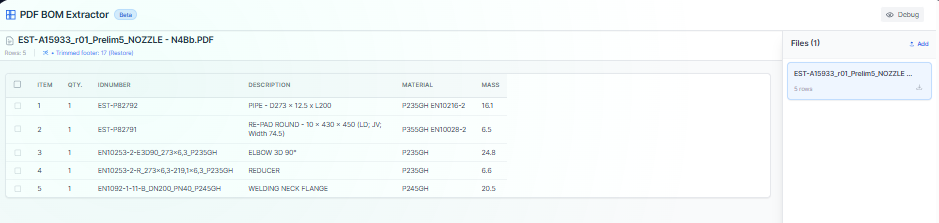
What it does
Drop CAD-generated PDFs, auto-detect header rows and columns, trim revision or footer noise, and export per-file CSVs or a merged master report. Everything runs client-side so drawings and extracted data stay on your device.
When to use it (and when not to)
Use it when:
- You want to pull BOM tables out of drawing PDFs without manual retyping.
- You need a quick CSV export to hand to procurement or QA.
- You prefer local parsing with no uploads.
Avoid it when:
- Your PDFs are scanned images that would need OCR to be read.
- Tables have heavy merged cells or variable column counts that break auto-detection.
Inputs and outputs
Inputs
| Input | Description |
|---|---|
| PDF drawings | Vector PDFs with BOM or spec tables. |
| Header row selection | Confirm or adjust which row defines the column headers. |
| Auto column detection toggles | Control how the parser groups columns. |
| Row filters | Skip revision or footer rows you do not want in the CSV. |
| Master report option | Combine outputs into one CSV when needed. |
Outputs
| Output | Format | Notes |
|---|---|---|
| Per-file CSV | CSV | One CSV for each PDF you process. |
| Master CSV | CSV | Optional combined report across all uploaded files. |
| Preview table | On-screen | Review and tweak before downloading. |
How to use
- Upload one or more drawing PDFs.
- Confirm the detected header row and adjust columns if needed.
- Trim any footer or revision rows.
- Download per-file CSVs or a master report.
- Archive the CSVs with your job packet.
Example dataset: Upload two assembly PDFs with BOM tables, keep header row 2, trim revision notes, and export both per-file CSVs and a master_report.csv.
- Expected output: Produces two individual CSVs plus a combined master file with aligned columns.
Accuracy and verification
- Relies on selectable text; scanned PDFs need OCR first.
- Merged or irregular tables may need manual cleanup after export.
- Review the preview before downloading to ensure the correct header row was detected.
- All parsing runs locally; keep your own backups of exported CSVs.
FAQ
- Does it OCR images? No. It reads vector text only.
- Can I process many files? Yes. Upload a batch and export per-file or as a master report.
- Is any data uploaded? No. Everything stays in the browser.
- How are merged cells handled? The parser flattens columns; double-check and adjust after export if needed.
- Can I change the delimiter? Exports as CSV; adjust delimiters later in your spreadsheet tool.
Related tools
Changelog
- Initial documentation.
Feedback / bug report
- Open a GitHub issue
- Email or DM with the slug
pdf-bom-extractorso we can reproduce the issue