Industrial Thermometer Configurator
Select ranges, stems, thermowells, and connections for industrial thermometers, preview the build, and export a PDF datasheet.
Open utility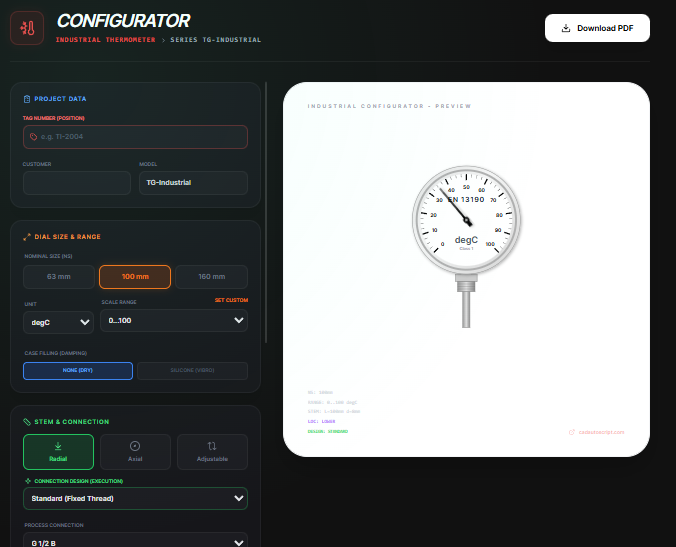
What it does
Configure a bimetal industrial thermometer: pick dial size, temperature range, stem length and diameter, mounting design, and thermowell options. Preview the SVG sketch and export a PDF datasheet with project metadata for submittals.
When to use it (and when not to)
Use it when:
- You are building an instrumentation package and need a quick thermometer datasheet.
- You want to verify stem length, connection, and thermowell options before ordering.
- You need a printable PDF to share with vendors or maintenance teams.
Avoid it when:
- You require certified pressure or vibration calculations beyond a preliminary datasheet.
- You are specifying electronic RTDs or transmitters instead of bimetal thermometers.
Inputs and outputs
Inputs
| Input | Description |
|---|---|
| Dial nominal size and unit | Select 63, 100, or 160 mm and choose Celsius or Fahrenheit ranges. |
| Temperature range | Preset spans or custom min/max to match process conditions. |
| Stem length, diameter, and material | Pick stem geometry and material for immersion requirements. |
| Connection location, design, and standard | Lower, back, or adjustable mounting with G, NPT, or metric threads. |
| Case material and fill | Dry or silicone-filled cases plus window selection. |
| Thermowell options | Enable solid or fabricated wells, choose design, material, process connection, insertion, and extension lengths. |
| Project metadata and accessories | Tag number, medium, standard, certificates, and options like red pointer or calibration cert. |
Outputs
| Output | Format | Notes |
|---|---|---|
| PDF datasheet | Generated locally with the configured selections and sketch. | |
| SVG preview | On-screen | Live drawing that updates as you change geometry. |
| Configuration summary | On-screen | Quick review of range, stem, connection, and thermowell choices. |
How to use
- Select dial size and temperature range (preset or custom).
- Set stem length, diameter, and material to match immersion needs.
- Pick connection location and thread standard; choose case fill and window.
- Enable and size a thermowell if required, then add project metadata.
- Review the preview and export the PDF datasheet.
Example dataset: Dial: 100 mm, Range: 0 to 200 C, Stem: 8 x 200 mm stainless, Mounting: lower G 1/2, Case: silicone filled, Thermowell: solid machined G 1/2 with 200 mm insertion, Tag: TI-310.
- Expected output: Outputs a PDF datasheet and preview for TI-310 showing the selected range, stem, mounting, and thermowell.
Accuracy and verification
- Datasheet is preliminary; confirm pressure limits and immersion rules with the manufacturer.
- Ensure sufficient insertion length for accurate sensing and to protect the element.
- Units and ranges reflect your input; double-check before issuing a PO.
- All processing stays local until you save the PDF.
FAQ
- Can I set a custom range? Yes. Switch to custom and enter your min and max.
- Does it support Fahrenheit? Yes. Choose the unit before selecting a range.
- Can I run it offline? Yes. Rendering and PDF export happen in the browser.
- Does it size thermowells automatically? It follows your entries; verify against pressure and immersion requirements.
- Where is my data stored? Only in your browser until you export the PDF.
Related tools
Changelog
- Initial documentation.
Feedback / bug report
- Open a GitHub issue
- Email or DM with the slug
industrial-thermometer-configuratorso we can reproduce the issue