PDF Number Extractor
Виділяйте серійні номери QA, ідентифікатори BOM та номери інспекцій локально за допомогою парсингу WASM та експорту в CSV.
Відкрити утиліту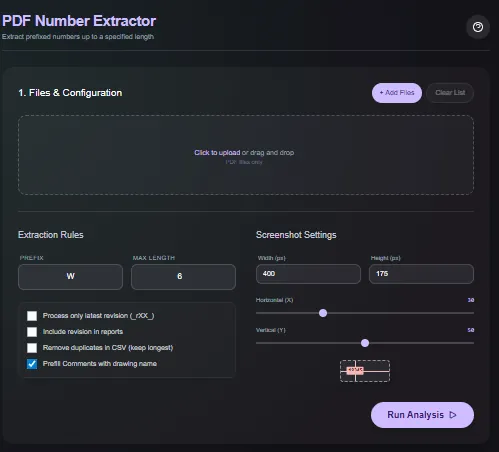
Що вона робить
Завантажуйте PDF-файли, фільтруйте знайдені числа за допомогою регулярних виразів (regex) або правил довжини та експортуйте чистий список збігів. Парсинг відбувається в браузері за допомогою WASM, тому серійні номери QA, ідентифікатори BOM та номери інспекцій ніколи не залишають ваш пристрій.
Коли використовувати (і коли не використовувати)
Використовуйте, коли:
- Вам потрібно витягти серійні номери або ідентифікатори з виробничих PDF для контролю якості (QA) або простежуваності.
- Ви хочете попередньо заповнити таблиці ідентифікаторами інспекцій без ручного введення.
- Ви віддаєте перевагу автономному робочому процесу без завантажень або черг.
Уникайте, коли:
- Ваші PDF — це відскановані зображення, що потребують OCR, а не парсингу тексту.
- Вам потрібен повнотекстовий пошук відразу за тисячами сторінок.
Вхідні та вихідні дані
Вхідні дані
| Вхід | Опис |
|---|---|
| PDF-файли | Один або кілька PDF, перетягнутих у браузер. |
| Правила Regex або фільтри | Включайте або виключайте шаблони, щоб ізолювати потрібні числа. |
| Мін/макс довжина | Необов'язкові обмеження, щоб уникнути шуму, такого як номери сторінок. |
| Опції експорту | Виберіть експорт у CSV або копіювання в буфер обміну. |
Вихідні дані
| Вихід | Формат | Примітки |
|---|---|---|
| Виділені збіги | На екрані | Візуальне накладання знайдених чисел для швидкої перевірки QA. |
| Експорт у CSV | CSV | Список витягнутих чисел для кожного файлу, готовий для таблиць. |
| Копіювання в буфер | Текст | Швидке копіювання збігів без завантаження файлу. |
Як використовувати
- Перетягніть PDF-файли в утиліту.
- Додайте фільтри за регулярним виразом (regex) або довжиною для вибору потрібних ID.
- Перевірте виділені збіги на екрані.
- Експортуйте результати в CSV або скопіюйте їх у буфер обміну.
- Очистьте сесію по закінченні; нічого не завантажується в інтернет.
Приклад даних: Завантажте звіт про інспекцію, що містить ID типу SN-2025-104; використовуйте regex виду SN-\d4-\d3 та експортуйте CSV.
- Очікуваний результат: Створюється CSV зі списком збігів у стилі SN-2025-104 та візуальне виділення на екрані для підтвердження.
Точність та перевірка
- Працює з текстовими PDF; відскановані зображення потребують OCR сторонніми засобами.
- Фільтри чутливі до регістру тільки якщо ви це вкажете; двічі перевірте шаблони перед експортом.
- Мережеві виклики не виконуються, тому зберігайте локальну копію результатів для аудиту.
- Вибірково перевірте кілька рядків за PDF, щоб переконатися, що regex не відфільтрував зайвого.
FAQ
- Чи розпізнає він текст на відсканованих PDF (OCR)? Ні. Він читає існуючий текст; якщо PDF є зображенням, спочатку використайте OCR.
- Чи можу я обробити кілька файлів? Так. Завантажте пакет PDF та експортуйте комбіновані результати.
- Чи завантажуються дані на сервер? Ні. Парсинг відбувається локально у вашому браузері.
- Чи можу я налаштувати регулярний вираз (regex)? Так. Підтримується стандартний синтаксис JavaScript regex.
- Чи можу я зберегти виділення (highlights)? Експортуйте CSV та збережіть копію PDF; виділення призначене лише для перевірки на екрані.
Схожі інструменти
Список змін
- Початкова документація.
Зворотний зв'язок / звіт про помилку
- Відкрити GitHub issue
- Напишіть на email або в особисті повідомлення із зазначенням слага
pdf-number-extractor, щоб ми могли відтворити проблему