Focus Planner
Преміальний локальний робочий простір для продуктивної роботи, управління завданнями та гейміфікованого відстеження фокусу — безпосередньо у вашому браузері.
Відкрити утиліту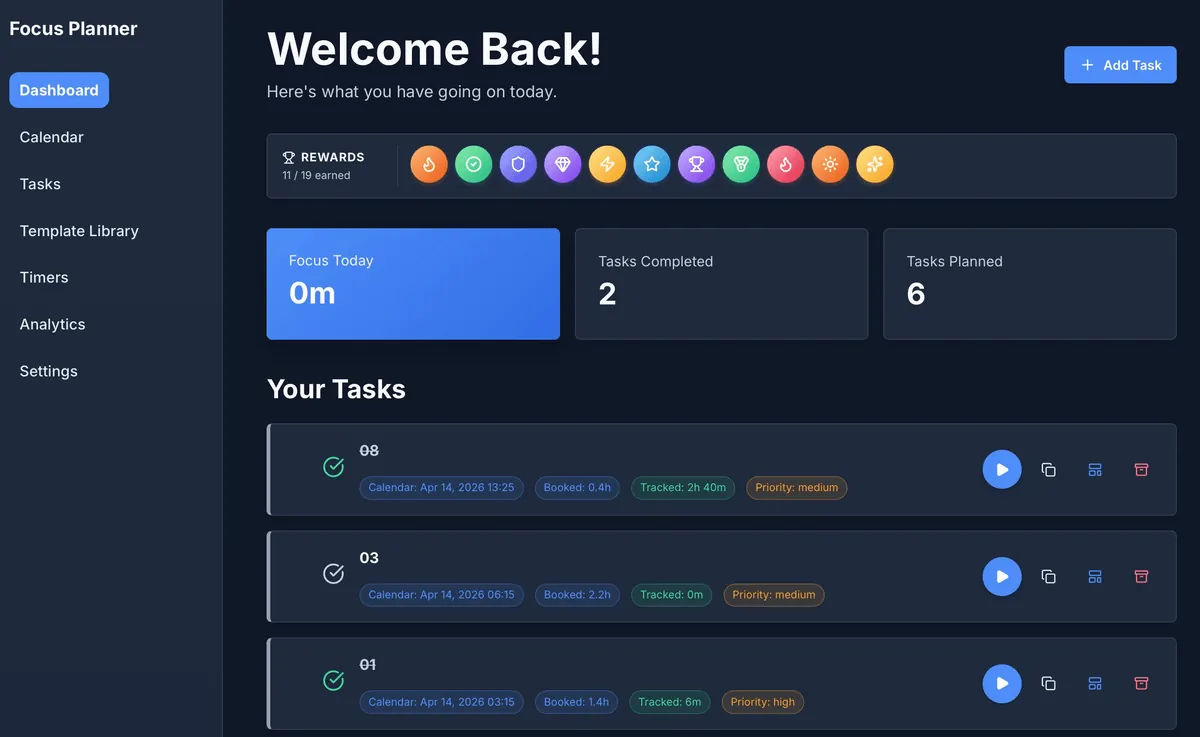
Преміальна продуктивність, локальна приватність
Focus Planner — це не просто черговий список завдань; це повноцінний робочий простір, побудований на філософії "Local-First". Ваші дані ніколи не залишають браузер, забезпечуючи повну приватність і надаючи потужні інструменти, які зазвичай доступні лише у хмарних рішеннях.
Ключові можливості
- Єдина панель управління: Чистий інтерфейс "Welcome Back", що показує ваш щоденний прогрес, зароблені нагороди та заплановані завдання одним поглядом.
- Гейміфікація успіху: Зберігайте мотивацію за допомогою вбудованої системи нагород. Отримуйте значки за досягнення цілей по фокусу та виконання запланованої роботи.
- Інтеграція з календарем: Плануйте свій час із точністю, використовуючи кілька режимів перегляду (День, Тиждень, Місяць, Квартал). Плануйте завдання безпосередньо в календарі.
- Вбудовані таймери: Починайте відстеження часу миттєво прямо зі списку завдань. Пов'язані таймери гарантують, що кожна хвилина фокусу буде віднесена до потрібного проєкту.
- Робота в офлайні: Створено для повної роботи в автономному режимі. Ваш прогрес зберігається локально і залишається доступним навіть після перезапуску браузера або оновлення сторінки.
Огляд робочого процесу
1. Планування
Визначте категорії та завдання у робочому просторі Tasks. Використовуйте Calendar, щоб забронювати час для глибокої роботи.
2. Фокус
Запустіть Dashboard, щоб побачити основні пріоритети на день. Використовуйте вбудовані кнопки "Play" на картках завдань, щоб почати сесії фокусу.
3. Огляд
Аналізуйте свою ефективність у вкладці Analytics. Відстежуйте розподіл фокусу за категоріями та спостерігайте, як зростає ваша колекція нагород.
4. Управління
Використовуйте Settings для налаштування зовнішнього вигляду, управління резервними копіями або експорту даних для зовнішнього використання.
Вхідні та вихідні дані
| Функція | Вхідні дані | Результат / Формат |
|---|---|---|
| Управління завданнями | Назви, Категорії, Пріоритети | Візуальний список завдань із відстеженням статусу |
| Планування | Розміщення в календарі, Дедлайни | Інтерактивні режими День/Тиждень/Місяць |
| Відстеження фокусу | Дії Play/Pause, Ручні сесії | Графіки аналітики та історія сесій (CSV) |
| Контроль даних | Локальне сховище, Імпорт JSON | Файли бекапу (JSON), звіти аналітики |
Коли використовувати Focus Planner
- Сесії глибокої роботи: Коли вам потрібне середовище без відволікаючих факторів для відстеження завдань з високою концентрацією.
- Планування з пріоритетом приватності: Коли вам потрібен професійний інструмент без необхідності створення аккаунта або хмарної синхронізації.
- Консолідований робочий процес: Коли ви хочете, щоб завдання, календар і таймери були в єдиному локальному інтерфейсі.
Точність і приватність
- Ніякої хмарної синхронізації: Дані не надсилаються на зовнішні сервери. Вся інформація залишається в IndexedDB вашого браузера.
- Відновлення таймера: Додаток розроблено для автоматичного відновлення активних таймерів після перезавантаження сторінки.
- Портативність даних: Ви повністю контролюєте свої дані. Експортуйте весь робочий простір у форматі JSON або окремі звіти у CSV у будь-який час.
FAQ
- Чи безпечні мої дані? Так, вони зберігаються локально у вашому браузері. Однак очищення даних сайту в браузері видалить ваші завдання, якщо ви не експортували резервну копію.
- Чи потрібен мені аккаунт? Ні. Просто відкрийте утиліту і почніть планування.
- Чи можу я синхронізувати дані між пристроями? Напряму — ні. Використовуйте функцію експорту/імпорту JSON у налаштуваннях (Settings), щоб перенести робочий простір на іншу машину.
Пов'язані утиліти
- Business Calendar Generator — Створення друкованих шаблонів планування.
- React Table Editor — Локальне управління табличними даними.
- Engineering Prompt Catalog — Промпти для продуктивності при вирішенні складних завдань.
Зворотний зв'язок / Звіт про помилку
- Відкрити issue на GitHub
- Напишіть на Email або в DM з вказанням ярлика
focus-planner, щоб ми могли відтворити будь-які проблеми.