Focus Planner
Esmaklassiline lokaalne produktiivsuse tööala, mis on loodud süvenenud tööks (deep work), ülesannete haldamiseks ja mängustatud fookuse jälgimiseks — kõik teie brauseris.
Ava utiliit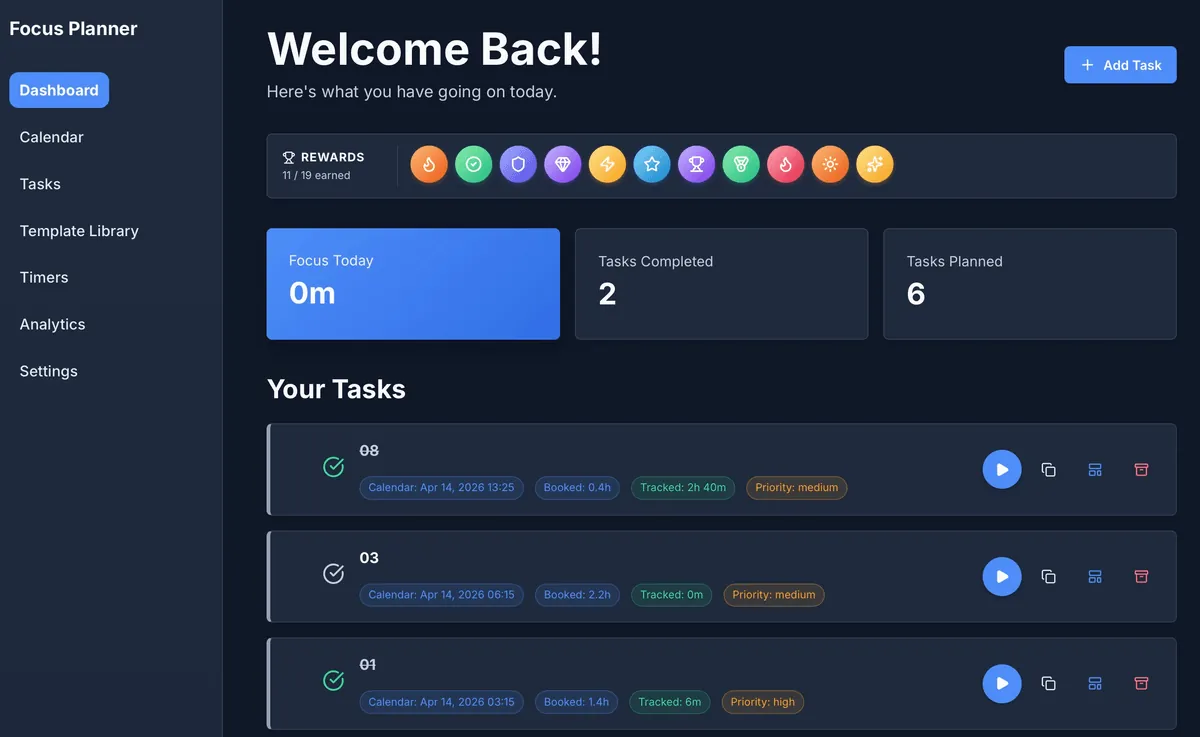
Esmaklassiline produktiivsus, lokaalne privaatsus
Focus Planner ei ole lihtsalt järjekordne ülesannete loend; see on terviklik tööala, mis põhineb "Local-First" filosoofial. Teie andmed ei lahku kunagi brauserist, tagades täieliku privaatsuse, pakkudes samas võimsaid tööriistu, mida tavaliselt leidub ainult pilvepõhistes lahendustes.
Põhivõimalused
- Ühtne töölaud (Dashboard): Puhas "Welcome Back" liides, mis näitab ühe pilguga teie igapäevast edenemist, teenitud auhindu ja planeeritud ülesandeid.
- Mängustatud edu: Püsi motiveeritud tänu integreeritud auhinnasüsteemile. Teeni märke (badges), kui saavutad oma fookuseesmärgid ja viid lõpule planeeritud tööd.
- Kalendri integratsioon: Planeeri oma aega täpselt, kasutades erinevaid vaateid (päev, nädal, kuu, kvartal). Planeeri ülesanded otse kalendrisse.
- Integreeritud taimerid: Alusta aja jälgimist kohe ülesannete loendist. Seotud taimerid tagavad, et iga fookusminut omistatakse õigele projektile.
- Võrguühenduseta töö: Loodud töötama täielikult offline-režiimis. Teie edusammud salvestatakse lokaalselt ja need jäävad kättesaadavaks ka pärast brauseri taaskäivitamist või lehe värskendamist.
Töövoo ülevaade
1. Planeerimine
Määrake oma kategooriad ja ülesanded Tasks tööalal. Kasutage Calendar vaadet, et broneerida aega süvenenud tööks.
2. Fookustamine
Käivitage Dashboard, et näha oma päeva peamisi prioriteete. Kasutage ülesandekaartidel olevaid integreeritud "Play" nuppe, et alustada fookussessioone.
3. Ülevaatus
Analüüsige oma tulemuslikkust vahekaardil Analytics. Jälgige fookuse jaotust kategooriate lõikes ja vaadake, kuidas teie auhindade kogu kasvab.
4. Haldamine
Kasutage Settings vaadet välimuse kohandamiseks, varukoopiate haldamiseks või andmete eksportimiseks väliseks kasutamiseks.
Sisendid ja väljundid
| Funktsioon | Sisend | Väljund / Formaat |
|---|---|---|
| Ülesannete haldus | Nimed, kategooriad, prioriteedid | Visuaalne ülesannete loend koos oleku jälgimisega |
| Planeerimine | Paigutus kalendris, tähtajad | Interaktiivsed päeva/nädala/kuu vaated |
| Fookuse jälgimine | Play/Pause tegevused, manuaalsed sessioonid | Analüütika graafikud ja sessioonide ajalugu (CSV) |
| Andmete kontroll | Lokaalne salvestusruum, JSON import | Varukoopiad (JSON), analüütika aruanded |
Millal kasutada Focus Plannerit
- Süvenenud töö sessioonid: Kui vajate häirimatut keskkonda kõrget kontsentratsiooni nõudvate ülesannete jälgimiseks.
- Privaatsust väärtustav planeerimine: Kui soovite professionaalset tööriista ilma vajaduseta konto loomiseks või pilvepõhiseks sünkroonimiseks.
- Koondatud töövoog: Kui soovite oma ülesandeid, kalendrit ja taimereid ühes lokaalses liideses.
Täpsus ja privaatsus
- Pilve sünkroonimine puudub: Andmeid ei saadeta välistesse serveritesse. Kogu teave jääb teie brauseri IndexedDB-sse.
- Taimeri taastamine: Rakendus on loodud aktiivsete taimerite automaatseks jätkamiseks pärast lehe uuesti laadimist.
- Andmete porditavus: Teie kontrollite oma andmeid. Eksportige kogu oma tööala JSON-vormingus või konkreetsed aruanded CSV-na igal ajal.
FAQ
- Kas minu andmed on ohutud? Jah, need on salvestatud lokaalselt teie brauserisse. Brauseri saidiandmete kustutamine kustutab aga ka teie ülesanded, kui te pole eksportinud varukoopiat.
- Kas ma vajan kontot? Ei. Lihtsalt ava utiliit ja alusta planeerimist.
- Kas ma saan seadmete vahel sünkroonida? Mitte otse. Kasutage seadetes (Settings) olevat JSON-i ekspordi/impordi funktsiooni, et liigutada oma tööala masinate vahel.
Seotud utiliidid
- Business Calendar Generator — Loo prinditavaid planeerimisšabloone.
- React Table Editor — Halda tabeliandmeid lokaalselt.
- Engineering Prompt Catalog — Produktiivsuse juhised keerukate ülesannete jaoks.
Tagasiside / Veaaruanne
- Ava issue GitHubis
- Kirjutage e-kiri või DM märksõnaga
focus-planner, et saaksime probleemid taasesitada.