Engineering Prompt Catalog
Explore una biblioteca seleccionada de plantillas de prompts para I&C, diseño mecánico y adquisiciones.
Abrir utilidad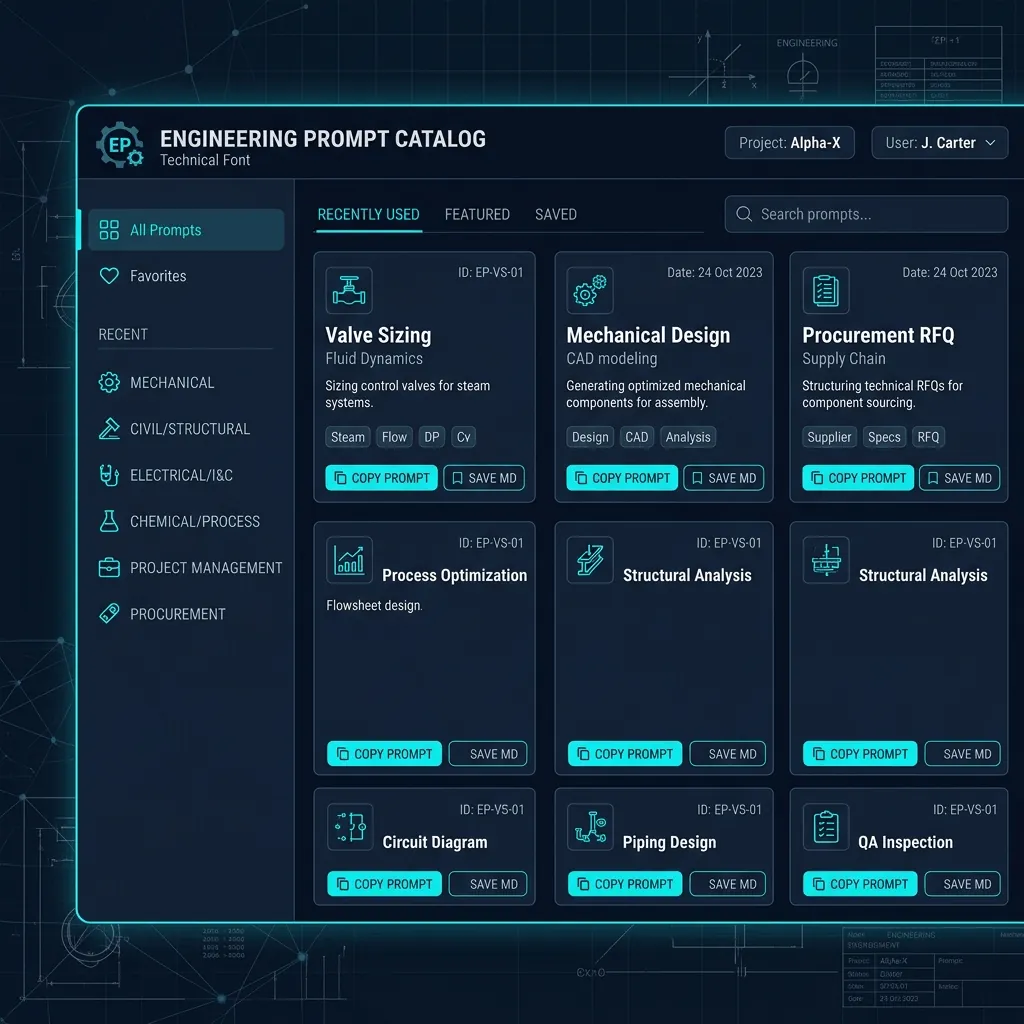
Qué hace
- Agrupa los prompts por disciplina y subcategoría para un filtrado rápido.
- Resalta los marcadores de posición para que pueda intercambiar valores reales en segundos.
- Copia los prompts al portapapeles o los descarga como Markdown.
- Utiliza un gráfico de un vistazo para saltar entre las categorías principales.
Cuándo usarlo (y cuándo no)
Úselo cuando:
- Necesite una estructura de prompt rápida y consistente para tareas técnicas.
- Quiera estandarizar cómo su equipo solicita especificaciones, cálculos o RFQs.
- Necesite una plantilla de prompt rápida sin abrir una biblioteca de documentos.
Evítelo cuando:
- El trabajo requiera datos confidenciales que no deban colocarse en herramientas de IA.
- Necesite el contexto completo del proyecto o la extracción de datos de planos.
Entradas y salidas
Entradas
| Entrada | Descripción |
|---|---|
| Filtro de categoría | Elija I&C, Mecánica o Adquisiciones para limitar los resultados. |
| Filtro de subcategoría | Profundice en áreas como Dimensionamiento de válvulas, SolidWorks o RFQ. |
| Buscar | Encuentre prompts por palabras clave en el objetivo o el texto del cuerpo. |
Salidas
| Salida | Formato | Notas |
|---|---|---|
| Tarjetas de prompts | En pantalla | Plantillas listas para copiar con marcadores de posición. |
| Copia al portapapeles | Texto sin formato | Un clic copia el prompt completo. |
| Archivo Markdown | .md | El archivo descargado utiliza el título del prompt como nombre de archivo. |
Cómo usar
- Abra la utilidad y elija una disciplina en la barra lateral.
- Seleccione una subcategoría o escriba una palabra clave en la barra de búsqueda.
- Haga clic en Copy para usar el prompt, o en Save MD para descargarlo.
- Reemplace los marcadores de posición entre corchetes con valores específicos del proyecto.
Ejemplo: Filtre I&C Engineer → Valve Sizing, copie el prompt de cálculo de Cv, reemplace [P1], [P2] y [Q], luego péguelo en su herramienta de IA.
Precisión y verificación
- Los prompts son solo plantillas. Siempre verifique los resultados con sus estándares y cálculos.
- Elimine los datos confidenciales antes de pegar los prompts en cualquier sistema externo.
- Mantenga los sistemas de unidades consistentes al completar los marcadores de posición.
FAQ
- ¿Funciona sin conexión? Sí. La biblioteca de prompts está integrada y funciona completamente en el navegador.
- ¿Puedo agregar mis propios prompts? Aún no. Este catálogo es un conjunto inicial fijo.
- ¿Almacenará o cargará mis datos? No. La copia y las descargas ocurren localmente.
- ¿Por qué los marcadores de posición están entre corchetes? Son fáciles de escanear y reemplazar antes de su uso.
Herramientas relacionadas
Historial de cambios
- Documentación inicial.
Comentarios / informe de errores
- Abrir un problema en GitHub
- Envíe un correo electrónico o un mensaje directo con el slug
engineering-prompt-catalogpara que podamos reproducir el problema.