PDF Number Extractor
Markieren Sie QA-Seriennummern, BOM-IDs und Inspektionsnummern lokal mit WASM-Parsing und CSV-Export.
Utility öffnen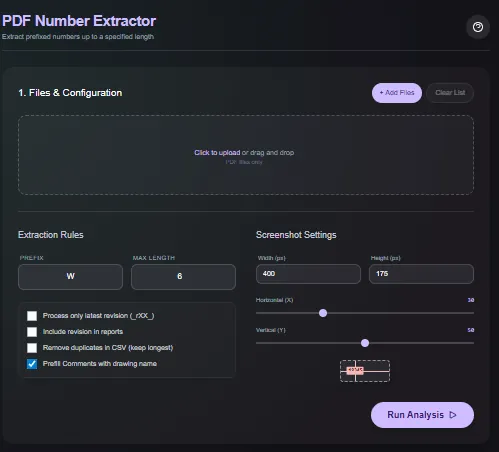
Funktionen
Laden Sie PDF-Dateien hoch, filtern Sie die erkannten Nummern mit Regex oder Längenregeln und exportieren Sie eine saubere Liste der Treffer. Das Parsing erfolgt im Browser mit WASM, sodass QA-Seriennummern, BOM-IDs und Inspektionsnummern niemals Ihr Gerät verlassen.
Wann man es verwendet (und wann nicht)
Verwenden Sie es, wenn:
- Sie Seriennummern oder IDs aus Produktions-PDFs für die Qualitätssicherung (QA) oder Rückverfolgbarkeit extrahieren müssen.
- Sie Tabellenkalkulationen mit Inspektions-IDs vorbefüllen möchten, ohne sie neu zu tippen.
- Sie einen Offline-Workflow ohne Uploads oder Warteschlangen bevorzugen.
Vermeiden Sie es, wenn:
- Ihre PDFs gescannte Bilder sind, die OCR anstelle von Text-Parsing erfordern.
- Sie eine Volltextsuche über Tausende von Seiten gleichzeitig benötigen.
Eingaben und Ausgaben
Eingaben
| Eingabe | Beschreibung |
|---|---|
| PDF-Dateien | Einzelne oder mehrere PDFs, die in den Browser gezogen werden. |
| Regex- oder Filterregeln | Muster einschließen oder ausschließen, um die benötigten Nummern zu isolieren. |
| Minimale/maximale Länge | Optionale Einschränkungen, um Rauschen wie Seitenzahlen zu vermeiden. |
| Exportoptionen | Wählen Sie den CSV-Export oder das Kopieren in die Zwischenablage. |
Ausgaben
| Ausgabe | Format | Hinweise |
|---|---|---|
| Markierte Treffer | Auf dem Bildschirm | Visuelle Überlagerung der gefundenen Nummern für eine schnelle QA. |
| CSV-Export | CSV | Liste der extrahierten Nummern pro Datei, bereit für Tabellenkalkulationen. |
| In Zwischenablage kopieren | Text | Schnelles Kopieren von Treffern ohne Herunterladen einer Datei. |
Bedienung
- Ziehen Sie die PDF-Dateien per Drag-and-Drop in das Utility.
- Fügen Sie Regex- oder Längenfilter hinzu, um die benötigten IDs zu isolieren.
- Überprüfen Sie die markierten Treffer am Bildschirm.
- Exportieren Sie die Ergebnisse als CSV oder kopieren Sie sie in Ihre Zwischenablage.
- Löschen Sie die Sitzung, wenn Sie fertig sind; es wird nichts hochgeladen.
Beispieldatensatz: Laden Sie einen Inspektionsbericht hoch, der IDs wie SN-2025-104 enthält; verwenden Sie eine Regex wie SN-\d4-\d3 und exportieren Sie die CSV.
- Erwartetes Ergebnis: Erzeugt eine CSV mit Treffern im Stil von SN-2025-104 und eine visuelle Markierung am Bildschirm zur Bestätigung.
Genauigkeit und Verifizierung
- Funktioniert mit textbasierten PDFs; gescannte Bilder benötigen anderweitig OCR.
- Filter berücksichtigen die Groß-/Kleinschreibung nur, wenn Sie dies so einstellen; prüfen Sie Muster vor dem Export doppelt.
- Es werden keine Netzwerkaufrufe getätigt. Behalten Sie daher eine lokale Kopie Ihrer Ergebnisse für einen Audit-Trail.
- Stichprobenartige Überprüfung einiger Zeilen gegen die PDF, um sicherzustellen, dass die Regex nicht zu stark gefiltert hat.
FAQ
- Unterstützt es OCR für gescannte PDFs? Nein. Es liest vorhandenen Text; verwenden Sie zuerst OCR, wenn die PDF ein Bild ist.
- Kann ich mehrere Dateien verarbeiten? Ja. Laden Sie einen Stapel PDFs hoch und exportieren Sie kombinierte Ergebnisse.
- Werden Daten hochgeladen? Nein. Das Parsing erfolgt lokal in Ihrem Browser.
- Kann ich die Regex anpassen? Ja. Die Standard-JavaScript-Regex-Syntax wird unterstützt.
- Kann ich die Markierungen speichern? Exportieren Sie die CSV und behalten Sie die PDF-Kopie; Markierungen dienen nur der Überprüfung am Bildschirm.
Ähnliche Tools
Changelog
- Initiale Dokumentation.
Feedback / Fehlerbericht
- GitHub Issue öffnen
- E-Mail oder DM mit dem Slug
pdf-number-extractor, damit wir den Fehler reproduzieren können