Focus Planner
Ein erstklassiger lokaler Produktivitäts-Arbeitsbereich für Deep Work, Aufgabenverwaltung und gamifiziertes Fokus-Tracking — direkt in Ihrem Browser.
Dienstprogramm öffnen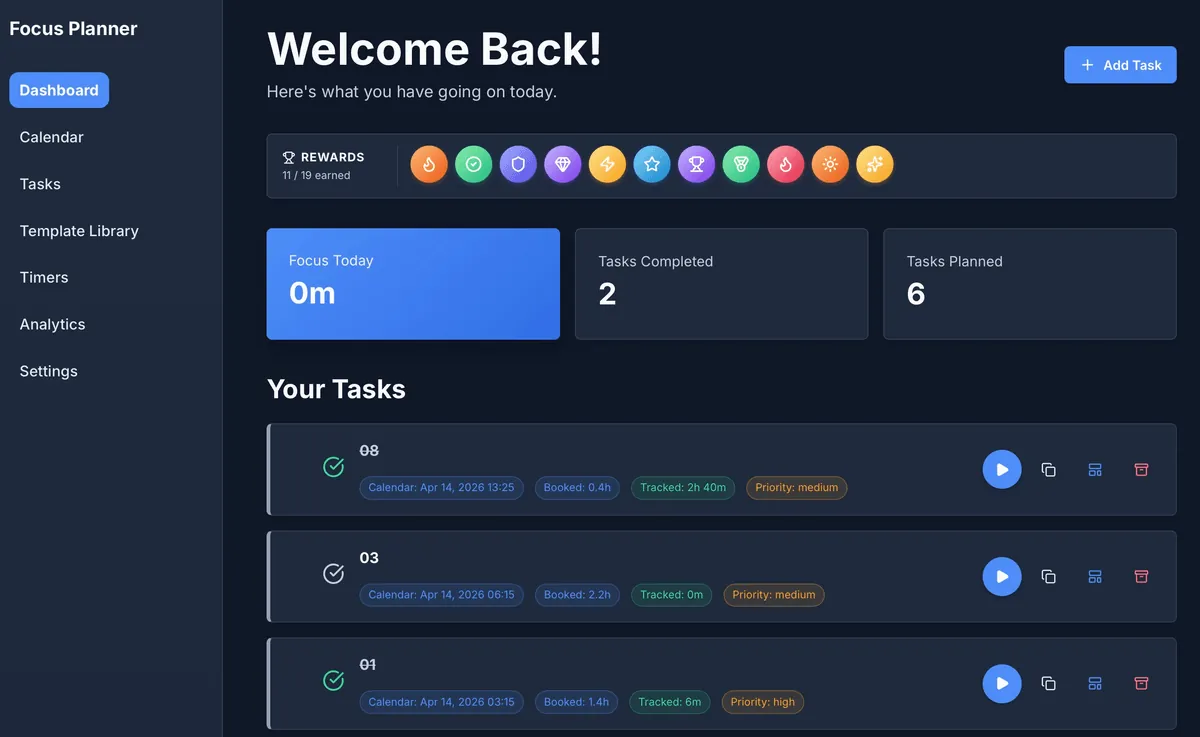
Erstklassige Produktivität, lokaler Datenschutz
Focus Planner ist nicht nur eine weitere Aufgabenliste; es ist ein umfassender Arbeitsbereich, der auf der "Local-First"-Philosophie basiert. Ihre Daten verlassen niemals Ihren Browser, was absolute Privatsphäre gewährleistet, während Sie gleichzeitig leistungsstarke Tools nutzen können, die normalerweise nur in Cloud-basierten Suiten zu finden sind.
Wichtige Funktionen
- Einheitliches Dashboard: Eine übersichtliche "Welcome Back"-Oberfläche, die Ihren täglichen Fortschritt, verdiente Belohnungen und geplante Aufgaben auf einen Blick anzeigt.
- Gamifizierter Erfolg: Bleiben Sie motiviert mit einem integrierten Belohnungssystem. Verdienen Sie Badges, wenn Sie Ihre Fokusziele erreichen und geplante Arbeiten abschließen.
- Kalenderintegration: Planen Sie Ihre Zeit präzise mit mehreren Ansichten (Tag, Woche, Monat, Quartal). Planen Sie Aufgaben direkt in Ihrem Kalender.
- Integrierte Timer: Starten Sie die Zeitmessung sofort aus Ihrer Aufgabenliste. Verknüpfte Timer stellen sicher, dass jede Minute Fokus dem richtigen Projekt zugeordnet wird.
- Offline-Meisterschaft: Entwickelt, um vollständig offline zu arbeiten. Ihr Fortschritt wird lokal gespeichert und bleibt auch nach Browser-Neustarts oder Seitenaktualisierungen verfügbar.
Workflow-Übersicht
1. Planen
Definieren Sie Ihre Kategorien und Aufgaben im Arbeitsbereich Tasks. Verwenden Sie den Calendar, um Zeit für Deep Work zu reservieren.
2. Fokussieren
Starten Sie das Dashboard, um Ihre wichtigsten Prioritäten für den Tag zu sehen. Verwenden Sie die integrierten "Play"-Buttons auf den Aufgabenkarten, um Fokus-Sitzungen zu starten.
3. Überprüfen
Analysieren Sie Ihre Leistung im Tab Analytics. Verfolgen Sie die Fokusverteilung über Kategorien hinweg und beobachten Sie, wie Ihre Belohnungssammlung wächst.
4. Verwalten
Verwenden Sie die Settings, um das Erscheinungsbild anzupassen, Backups zu verwalten oder Ihre Daten für die externe Verwendung zu exportieren.
Eingaben und Ausgaben
| Funktion | Eingabe | Ausgabe / Format |
|---|---|---|
| Aufgabenverwaltung | Namen, Kategorien, Prioritäten | Visuelle Aufgabenliste mit Statusverfolgung |
| Planung | Kalenderplatzierung, Deadlines | Interaktive Tag/Woche/Monat-Ansichten |
| Fokus-Tracking | Play/Pause-Aktionen, Manuelle Sitzungen | Analyse-Diagramme & Sitzungsverlauf (CSV) |
| Datenkontrolle | Lokaler Speicher, JSON-Import | Backup-Dateien (JSON), Analyseberichte |
Wann man Focus Planner verwenden sollte
- Deep Work Sitzungen: Wenn Sie eine ablenkungsfreie Umgebung benötigen, um Aufgaben mit hoher Konzentration zu verfolgen.
- Privacy-First Planung: Wenn Sie ein professionelles Tool ohne die Notwendigkeit eines Kontos oder einer Cloud-Synchronisierung wünschen.
- Konsolidierter Workflow: Wenn Sie Ihre Aufgaben, Ihren Kalender und Ihre Timer in einer einzigen, lokalen Schnittstelle haben möchten.
Genauigkeit und Datenschutz
- Kein Cloud-Sync: Es werden keine Daten an externe Server gesendet. Alle Informationen bleiben in der IndexedDB Ihres Browsers.
- Timer-Wiederherstellung: Die App ist so konzipiert, dass aktive Timer nach dem Neuladen der Seite automatisch fortgesetzt werden.
- Datenportabilität: Sie haben die Kontrolle über Ihre Daten. Exportieren Sie Ihren gesamten Arbeitsbereich als JSON oder spezifische Berichte jederzeit als CSV.
FAQ
- Sind meine Daten sicher? Ja, sie werden lokal in Ihrem Browser gespeichert. Das Löschen der Websitedaten Ihres Browsers löscht jedoch Ihre Aufgaben, es sei denn, Sie haben ein Backup exportiert.
- Benötige ich ein Konto? Nein. Öffnen Sie einfach das Tool und beginnen Sie mit der Planung.
- Kann ich zwischen Geräten synchronisieren? Nicht direkt. Verwenden Sie die Export/Import-JSON-Funktion in den Einstellungen (Settings), um Ihren Arbeitsbereich zwischen Maschinen zu verschieben.
Verwandte Utilities
- Business Calendar Generator — Erstellen Sie druckbare Planungsvorlagen.
- React Table Editor — Verwalten Sie tabellarische Daten lokal.
- Engineering Prompt Catalog — Produktivitäts-Prompts für komplexe Aufgaben.
Feedback / Fehlerbericht
- GitHub-Issue öffnen
- E-Mail oder DM mit dem Kürzel
focus-planner, damit wir etwaige Probleme reproduzieren können.